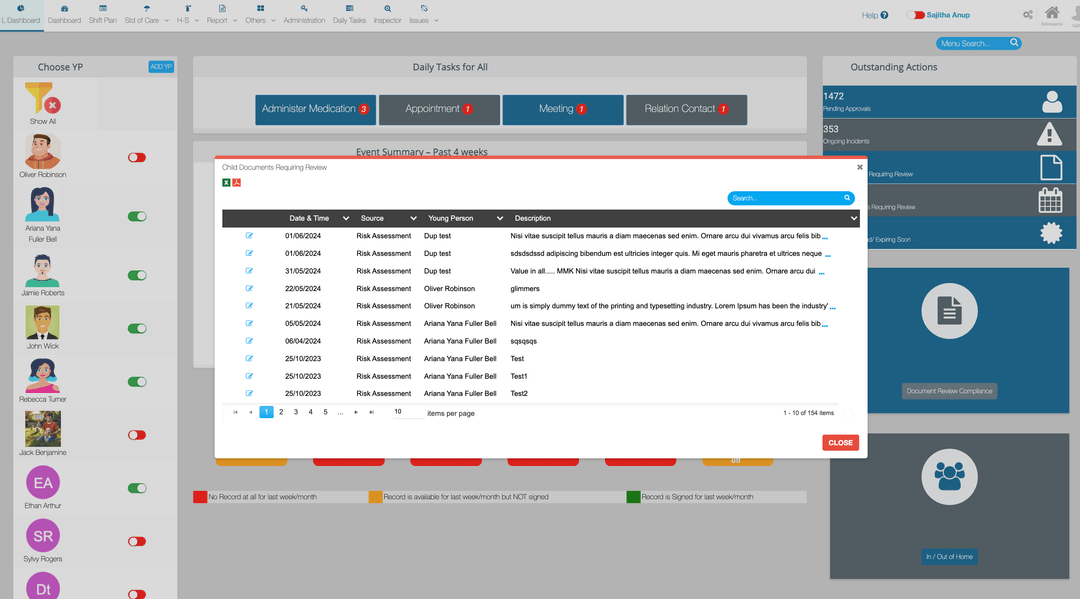
An all-in-one care management platform brings care records, daily logs, incidents, medication, HR, compliance and reporting into one connected system. This can reduce duplicate entry, make information easier to find and give managers a clearer view across one or several children's homes.
Running a children's home means balancing two responsibilities that cannot be separated: providing consistent, child-centred care and maintaining accurate evidence of the work behind it. When information is spread across paper files, spreadsheets and separate systems, staff spend more time finding, copying and reconciling records.
Cloud-based care management software is intended to reduce that operational friction. Instead of treating care records, staffing and compliance as disconnected tasks, an all-in-one platform keeps them within a shared structure. This guide explains where that approach can help, what providers should look for and how OVcare fits into the picture.
What makes an all-in-one platform different?
A collection of digital tools is not necessarily an integrated system. If staff still have to transfer information between applications, maintain parallel spreadsheets or search several places before an inspection, the underlying fragmentation remains.
An all-in-one platform connects the everyday parts of running a service, including:
- Daily logs, key-work records and care planning
- Incidents, safeguarding concerns and risk assessments
- Medication records and health information
- Staff records, rotas, training and safer recruitment evidence
- Policies, audits, quality reviews and regulatory reporting
- Management dashboards and multi-home oversight
The value comes from the connections between those areas. A manager should be able to move from a high-level trend to the underlying record without rebuilding the story manually.
| Operational area | Disconnected approach | All-in-one approach |
|---|---|---|
| Recording | The same information may be copied into several documents. | Records are entered once and connected to the relevant person, event or workflow. |
| Oversight | Managers assemble reports from different files and systems. | Dashboards and reports draw from a shared source of information. |
| Staff onboarding | New starters learn several tools and inconsistent processes. | Teams learn one interface and a more consistent recording structure. |
| Inspection preparation | Evidence is gathered manually when it is requested. | Records remain structured and accessible throughout the year. |
Save staff time and reduce duplicated administration
Care staff should not have to spend their shifts switching between systems or re-entering the same information. A connected platform can shorten everyday workflows by keeping the relevant forms, records and follow-up actions together.
The aim is not simply to make individual forms faster. It is to reduce the wider administrative chain around them: looking for the latest version, checking whether information was copied correctly, reminding colleagues to update another system and rebuilding evidence for managers later.
When designing or assessing a workflow, providers should ask whether it:
- Can be completed quickly during a normal shift
- Prompts staff for the information the service genuinely needs
- Creates follow-up actions without separate spreadsheets
- Shows managers what is incomplete or overdue
- Produces a clear and attributable audit trail
Reduce overlapping software and hidden operational costs
The monthly price of software is only one part of its cost. Providers also absorb the time spent training staff, maintaining duplicate systems, correcting errors and producing reports manually.
Consolidating care, HR, compliance and reporting can reduce the need for overlapping subscriptions. More importantly, it can reduce the operational cost of fragmented information. The financial case should therefore consider staff time, management oversight and implementation support—not just the licence price.
Compare the complete cost, not only the headline fee. OVcare uses flat-rate pricing per home or setting, with unlimited young people and beds. See the current options on the OVcare pricing page.
Keep information in one connected place
Separate systems create data silos. A child's record might sit in one application, incident information in another and staffing evidence in a spreadsheet. Even when every individual record is accurate, it can be difficult to understand the whole picture.
A connected system gives each authorised user access to the information relevant to their role. It also helps managers review relationships between different records—for example, whether repeated incidents connect with changes in plans, staffing, education, health or key-work activity.
This does not remove the need for professional judgement. It gives teams a more complete and current evidence base on which to apply that judgement.
Improve record quality and management oversight
Good records do more than prove that a task happened. They should help the service understand children's experiences, identify patterns and decide what needs to change.
Structured digital recording can support that by making entries attributable, dated and easier to review. Managers can monitor outstanding work, sample records and identify recurring themes without waiting for the next audit or inspection.
For multi-home providers, a consistent system also makes comparison more meaningful. Leaders can see where practice is working well, where support is needed and whether actions are being completed across the organisation.
Make staff training and adoption simpler
Even capable software will fail if staff find it difficult to use. When teams have to learn several systems with different conventions, onboarding becomes slower and workarounds become more likely.
A shared interface and consistent workflow can make training more manageable. Providers should still test the system with the people who will use it every day. Useful questions include:
- Can staff find the right task without relying on a manager?
- Are forms clear on mobile devices as well as desktop computers?
- Does the system explain what is required at each step?
- Can managers identify where further coaching is needed?
- Is ongoing training available when new staff join?
Protect sensitive care information
Children's records, health information and staff files require careful control. Moving records into the cloud should therefore be accompanied by clear decisions about access, security, retention and export.
Providers should examine where data is stored, how access is assigned and removed, whether activity is logged, how backups work and how information can be exported when required. Role-based access is particularly important: a connected platform should not mean that every user can see every record.
OVcare is Cyber Essentials Plus certified, uses UK data storage and provides role-based access controls. Organisations remain responsible for configuring access appropriately and following their own data-protection and records-management policies.
Turn everyday records into better management information
Digital records are most useful when they improve decisions rather than simply reproduce paper forms on a screen. A connected platform can help teams review themes across incidents, outcomes, staffing and day-to-day practice.
This makes it easier to move from individual entries to questions such as:
- Are particular incidents becoming more or less frequent?
- Are agreed actions producing the intended change?
- Which records are overdue or incomplete?
- Where do staffing or training gaps affect delivery?
- Can leaders demonstrate how oversight has improved practice?
Reports still need interpretation and professional challenge. The platform's role is to make the underlying evidence easier to access, compare and act upon.
What to look for before choosing a platform
Before committing to any care management system, providers should test it against real operational scenarios. Ask the supplier to demonstrate how a member of staff records an event, how a manager reviews it and how the same information appears in a report.
Key areas to examine include:
- Fit with children's homes and supported accommodation rather than generic adult-care workflows
- Ease of use for frontline staff
- Mobile access and performance
- Role-based permissions and audit trails
- Reporting, export and long-term record accessibility
- Implementation, migration, training and ongoing support
- Pricing as the organisation adds homes or settings
A demonstration should use examples from your service rather than a generic product tour. It should leave you able to judge whether the software will remove work or simply move it somewhere else.
How OVcare brings care management together
OVcare is designed for UK children's homes, supported accommodation and family assessment centres. It combines care records, daily logging, incidents, medication, HR, rotas, policies, quality assurance and reporting within one platform.
The objective is straightforward: give staff one clear place to record their work and give managers faster access to the evidence behind the service. OVcare also includes an Inspector Portal, allowing authorised visitors to review structured evidence without navigating the wider operational system.
You can explore the platform's main capabilities on the care management software features page.
See how the workflow would look in your service. Book a free demonstration and bring one or two processes that currently consume the most staff or management time. The OVcare team can show how those processes would work in the platform. Book a free OVcare demo.
Originally published in September 2024 and reviewed in August 2026. Product capabilities and pricing may change; confirm requirements relevant to your service during a demonstration.